
Random reboots and unexpected disconnections on the Arlo Q are among the most frustrating operational failures because they are intermittent; the camera works correctly for periods of minutes or hours, then fails suddenly and unpredictably, leaving gaps in recordings, missed motion events, and an unreliable security posture. The intermittent nature also makes diagnosis harder: the camera appears functional when checked, making it tempting to conclude the problem has resolved itself, only for it to recur the next night.
Intermittent reboots and disconnections on the Arlo Q have four distinct categories of cause: power delivery problems, thermal management failures, Wi-Fi connectivity instability, and firmware or cloud service issues. Each category has a characteristic pattern that distinguishes it from the others, and each requires a different fix. This guide identifies the pattern signatures of each category and provides the targeted resolution for each.
DISTINGUISHING REBOOTS FROM DISCONNECTIONS
Before diagnosis, confirm which event is occurring; they look similar in the Arlo app but have different causes:
Reboot event
The camera goes offline, its LED cycles through startup behavior (blinking blue, potentially a brief amber), and the camera reappears online after 1–3 minutes. The Arlo app shows the camera as offline and then online again. Recorded video shows a gap at the reboot time with possible partial recording immediately before.
Disconnection event
The camera goes offline but does not reboot its LED may go dark or remain in a connected-but-not-streaming state. The camera may return online quickly (within 30 seconds) as the Wi-Fi connection recovers, or it may require manual intervention. Recorded video shows a gap but the camera’s uptime counter in the app was not reset.
Reboots indicate a hardware or firmware protective restart. Disconnections indicate a network or cloud connectivity interruption. The fixes are different.
CATEGORY 1: POWER DELIVERY INSTABILITY (CAUSE OF REBOOTS)
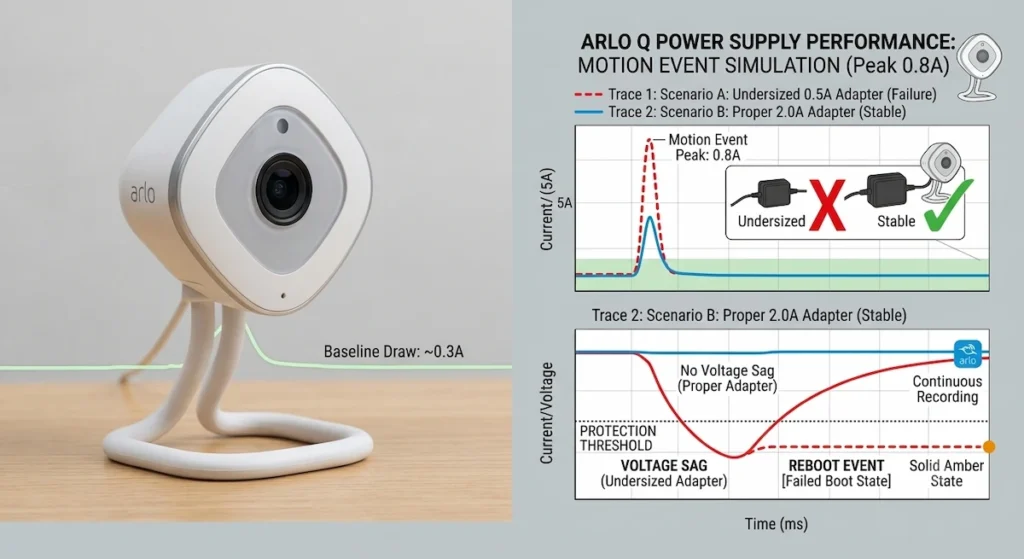
Power delivery instability is the leading cause of spontaneous Arlo Q reboots. The camera’s power management circuit continuously monitors its supply voltage. When the voltage drops below a protection threshold, even briefly, the circuit initiates a protective restart to prevent processor state corruption.
Why power delivery fluctuates
The Arlo Q’s power draw is not constant it peaks during active 1080p recording, IR LED illumination, and Wi-Fi transmission. If the AC adapter or cable is operating at or near its maximum capacity, these peak demand moments cause the voltage to sag momentarily below the protection threshold, triggering a reboot.
Pattern signature of power-related reboots:
- Reboots occur during or immediately after motion events (the peak-draw moment)
- Reboots occur more frequently at night when IR LEDs are active (adds 150–200mA to base draw)
- Reboots are more frequent on cable runs longer than 6 feet with standard cable
- Reboots are eliminated when the camera is connected with a short, thick cable directly to a high-capacity adapter
Fixes
1. Replace the AC adapter with a 5V/2A (10W) regulated USB adapter. The 2A capacity provides headroom above the camera’s peak draw.
2. For cable runs longer than 6 feet, replace the cable with 22 AWG or better. The physics of voltage drop and cable gauge selection are fully covered in the companion guide How to Choose the Right Long Micro-USB Cable for Arlo Q Continuous Power.
3. Ensure the AC adapter is not shared with another device (using a multi-port USB charger where both ports are active). Shared adapters have their total current capacity split between ports.
CATEGORY 2: THERMAL OVERLOAD (CAUSE OF REBOOTS)
The Arlo Q’s processor includes a thermal management circuit that initiates a protective shutdown and restart when the die temperature exceeds the thermal design point. In a well-ventilated installation, normal operation does not approach this threshold. In installations with poor ventilation or elevated ambient temperatures, the camera’s cumulative heat output during continuous recording and IR operation gradually builds up until the thermal threshold is crossed.
Pattern signature of thermal reboots
Reboots occur after extended recording sessions (30+ minutes of continuous motion recording)
- Reboots are more frequent in summer or during heat events
- Reboots occur less frequently or not at all during cooler months with identical usage patterns
- The camera housing is warm to hot when inspected shortly after a reboot event
Fixes
1. Relocate the camera to a position with better air circulation away from HVAC supply vents, ceiling corners with limited airflow, or enclosed shelving.
2. Ensure the cable entry at the camera base does not block any ventilation openings in the housing.
3. In environments with consistently high ambient temperatures (above 30°C), consider whether the installation location can be improved or whether an external mounting solution provides better airflow.
CATEGORY 3: WI-FI CONNECTIVITY INSTABILITY (CAUSE OF DISCONNECTIONS)
Wi-Fi disconnections are caused by the Wi-Fi link between the Arlo Q and the router failing intermittently. This can result from:
Weak or borderline RSSI:
The Arlo Q requires approximately −65 to −70 dBm RSSI minimum for stable 1080p streaming. At borderline signal levels, the camera maintains a connected state during low-activity periods but drops the connection when the bandwidth demand of active streaming exceeds what the marginal signal quality can sustain.
Pattern: Disconnections coincide with active recording events (the streaming demand moment) the camera is online while idle but drops offline when it begins streaming a motion event.
2.4 GHz channel congestion:
In multi-unit residential environments (apartment buildings, dense suburbs), the 2.4 GHz band’s three non-overlapping channels (1, 6, 11) may all be congested with neighboring networks. High channel utilization reduces effective throughput even at adequate RSSI levels.
Pattern: Disconnections occur at predictable times (evenings when all neighbors are home and using Wi-Fi) regardless of camera activity.
Router DHCP lease renewal:
Some routers renew DHCP IP leases in a way that briefly drops the Wi-Fi connection during renewal. The Arlo Q’s network stack may not handle the brief connectivity interruption gracefully, resulting in a disconnect that requires a reconnection handshake.
Pattern: Disconnections occur at regular time intervals (matching the DHCP lease duration, often 24 hours) or at a fixed time of day.
Fixes
1. Check RSSI in the Arlo app (Devices → Camera → Device Info → Signal Strength). If below −65 dBm, improve signal strength by repositioning the camera or adding a Wi-Fi extender.
2. Use a Wi-Fi analyzer app on a smartphone to check channel utilization at the camera’s location. If the channel is crowded, change the router’s 2.4 GHz channel to the least congested of channels 1, 6, or 11.
3. Assign the Arlo Q a static IP address in the router’s DHCP reservation settings, eliminating lease renewal interruptions.
4. The detailed network configuration for Arlo Q dual-band environments is covered in the companion guide How to Fix Arlo Q Connection Drops on 2.4GHz vs. 5GHz Dual-Band Networks.
CATEGORY 4: FIRMWARE AND CLOUD SERVICE ISSUES (CAUSE OF BOTH REBOOTS AND DISCONNECTIONS)
Firmware bugs and Arlo cloud service interruptions can cause both rebooting and disconnection events:
Firmware-triggered reboot loops:
Specific firmware versions have been documented by Arlo users to cause spontaneous reboots in certain network configurations. These reboots are typically resolved by a subsequent firmware update that Arlo pushes over-the-air. Checking the Arlo community forums for reports of reboots correlating with a recent firmware version provides context.
Arlo cloud service interruptions:
The Arlo Q requires a persistent connection to Arlo’s cloud servers for its full function. A cloud service interruption appears as a disconnection event the camera goes offline even though it is connected to the local Wi-Fi network. The camera returns online when the Arlo cloud service recovers.
Pattern: Simultaneous offline events affecting multiple Arlo cameras at the same time, or offline events that affect all users (not just one household).
Fix: Check Arlo’s service status page (status.arlo.com) during a disconnection event to confirm whether a cloud outage is active.
BUILDING A REBOOT/DISCONNECT LOG
The most effective diagnostic tool for intermittent events is a log. Enable Arlo’s event history and note the timestamp and ambient conditions (time of day, temperature, activity level) of each reboot or disconnect event. After 5–10 events, patterns emerge:
Events clustered around motion recordings → power delivery cause
Events clustered in afternoons/evenings in summer → thermal cause
Events at peak network usage hours → channel congestion
Events at regular time intervals → DHCP renewal cause
Events simultaneous across multiple cameras → cloud service cause