
The Arlo Q’s video quality is the product of two interacting optical systems: the image sensor that converts photons into electrical signals, and the lens that focuses the scene onto that sensor. Neither system can be evaluated in isolation; a high-resolution sensor behind a poor lens produces soft, distorted video, while a precision lens in front of a small, noisy sensor produces sharp but detail-limited footage. Understanding both the sensor and the lens, and how their specifications interact to produce the Arlo Q’s specific video characteristics, provides the framework for interpreting the camera’s performance under different lighting conditions, understanding its motion detection capability, and diagnosing optical failure symptoms.
IMAGE SENSOR SPECIFICATIONS
The Arlo Q uses a 1/3-inch CMOS image sensor producing 1920×1080 pixel (1080p Full HD) video. The specific sensor model is not publicly disclosed by Arlo/Netgear, but the sensor class is consistent with the OmniVision OV2710 or a similar 1/3-inch 2-megapixel sensor widely used in this generation of Wi-Fi security cameras.
Sensor format: 1/3-inch (4.8mm × 3.6mm active area)
Resolution: 1920×1080 pixels (2.07 megapixels)
Pixel size: approximately 2.4-3.0 microns (typical for 1/3-inch 2MP sensors)
Frame rate: up to 30 fps at 1080p
Video encoding: H.264 (MPEG-4 AVC)
Color depth: 24-bit RGB
Dynamic range: approximately 65–70 dB (typical for this sensor class)
The 1/3-inch sensor format is the dominant format in this price tier of security cameras. It is significantly smaller than the 1/2.3-inch sensors found in entry-level smartphone cameras and far smaller than the 1-inch sensors used in premium security cameras. This size constraint has direct consequences for low-light performance: smaller pixels collect fewer photons per exposure period, which means a lower signal-to-noise ratio in dim conditions.
The practical implication: the Arlo Q produces clean, detailed 1080p video in well-lit environments but exhibits visible noise and softness in low-light conditions before the IR night vision activates. The transition between color daytime mode and black-and-white IR night vision mode is automatic and threshold-based; it occurs at a specific ambient light level determined by the camera firmware.
THE LENS: 130-DEGREE FIELD OF VIEW AND OPTICAL SPECIFICATIONS
The Arlo Q uses a fixed-focus, wide-angle lens with a 130-degree diagonal field of view. Fixed-focus means the lens cannot zoom the focal length optically; it is set at manufacture for a specific depth of field that keeps subjects in focus from approximately 2-3 feet in front of the camera to infinity.
Focal length: approximately 2.8mm (typical for 130-degree FOV on a 1/3-inch sensor)
Aperture: f/2.0 (typical for this class allows adequate light collection in indoor ambient light)
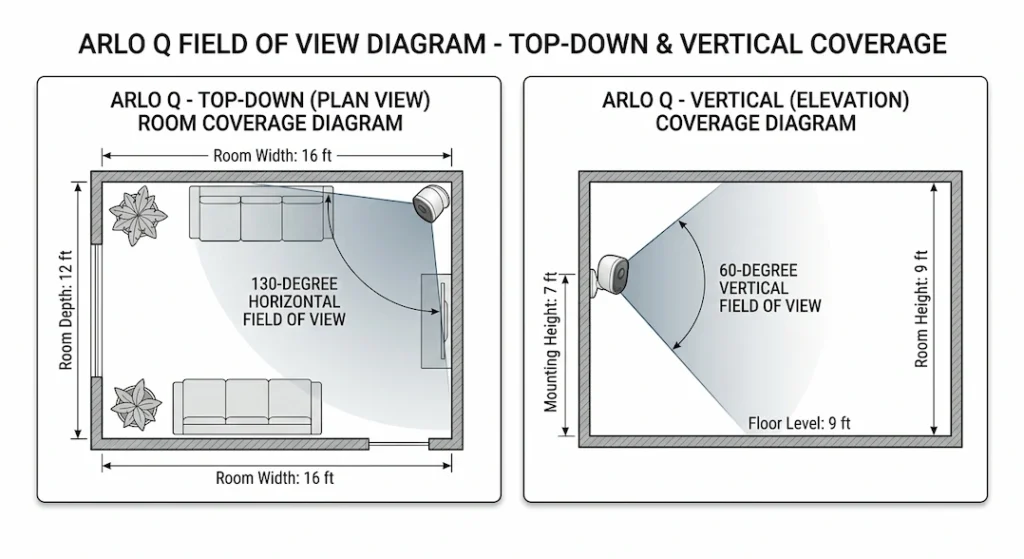
Field of view: 130 degrees diagonal
Horizontal field of view: approximately 110-115 degrees
Vertical field of view: approximately 60-65 degrees
Minimum focus distance: approximately 2-3 feet (0.6-0.9 meters)
Lens construction: multi-element glass lens with IR coating
The 130-degree field of view is what makes the Arlo Q suitable for monitoring full room coverage from a single camera position. A 130-degree FOV from a corner or high-shelf position can cover the majority of a typical bedroom, living room, or home office without the partial blind spots that narrower-FOV cameras create.
WIDE-ANGLE DISTORTION: THE BARREL DISTORTION CHARACTERISTIC
A 130-degree field of view lens inherently produces barrel distortion, a radial distortion pattern where straight lines near the edges of the frame bow outward from the center. This is a physical consequence of projecting a 130-degree cone of light onto a flat rectangular sensor, not a defect in the specific lens, but an inherent characteristic of wide-angle optics.
Barrel distortion in Arlo Q footage appears as:
- Slight bowing of wall edges, doorframes, and straight shelves near the frame edges
- Objects near the frame center appearing at normal scale while objects near the corners appear slightly stretched
- The “fisheye” appearance associated with very wide-angle cameras, though less pronounced than true fisheye lenses
The Arlo Q’s firmware does not apply software correction for barrel distortion. The raw sensor output with distortion intact is what appears in recordings. For evidentiary or measurement purposes, barrel distortion means that dimensions measured from Arlo Q footage are not geometrically accurate near the frame edges.
THE INFRARED CUT FILTER (ICF): THE DAY/NIGHT SWITCHING MECHANISM
The Arlo Q’s color accuracy in daylight and its night vision capability are both enabled by a single mechanical component: the infrared cut filter (ICF), also called an IR-cut filter or day/night filter.
What the ICF does
The CMOS image sensor responds to infrared light as well as visible light. Without filtering, infrared light from sunlight, indoor lighting, and the camera’s own IR LEDs would contaminate the color image, causing inaccurate color reproduction (particularly in reds and flesh tones).
In daytime mode: A glass or crystal filter (the ICF) is positioned between the lens and the sensor, blocking infrared wavelengths above approximately 700nm and allowing only visible light to reach the sensor. This produces accurate color video.
In nighttime/low-light mode: The ICF is mechanically retracted (moved out of the light path by a small electromagnetically actuated slider mechanism). With the ICF removed, the sensor can receive the infrared light emitted by the Arlo Q’s built-in IR LEDs, producing black-and-white night vision video with the characteristic glow of active IR illumination.
The clicking sound during day/night transitions
Every time the Arlo Q switches between day and night mode, the ICF actuator mechanism moves the filter in or out of the light path, producing a distinct mechanical click sound. This is normal operation; the click is the filter slider moving. Owners who are unfamiliar with ICF mechanisms often report this as a concerning malfunction. It is not.
However, the ICF mechanism can develop a genuine fault: the filter can become stuck in an intermediate position (partially blocking the light path), or the actuator can jam. A stuck ICF produces specific symptoms: a pink-tinted color image during the day (ICF not blocking IR) or a persistent black-and-white image regardless of lighting (ICF stuck in the night position). The detailed diagnosis and repair of ICF sticking is covered in the companion guide How to Fix a Clicking Noise on Arlo Q (Infrared Cut Filter Getting Stuck).
THE IR LED ARRAY: NIGHT VISION ILLUMINATION SPECIFICATIONS
The Arlo Q’s night vision is enabled by an array of infrared LEDs mounted on the camera face surrounding the lens. These LEDs emit infrared light at approximately 850nm wavelength, invisible to the human eye but detectable by the CMOS image sensor with the ICF retracted.
IR LED configuration: Multiple LEDs (typically 6–8) arranged in a circular pattern around the lens
IR wavelength: 850nm (near-infrared)
Effective night vision range: up to 25 feet (7.6 meters) in complete darkness under manufacturer’s specified conditions
Night vision mode: automatic (triggered by ambient light level falling below the threshold)
The 850nm wavelength produces a faint visible glow from the LEDs, a dim red-orange light visible in the dark. This is normal and does not indicate a fault. Cameras using 940nm IR LEDs produce completely invisible IR illumination, but the Arlo Q uses the more common 850nm type.
Night vision quality is heavily influenced by the reflectivity of surfaces in the camera’s field of view. Light-colored surfaces (white walls, pale carpets) reflect IR efficiently, producing well-illuminated night vision footage. Dark-colored surfaces absorb IR and appear darker in night vision footage. The Arlo Q’s night vision range of 25 feet applies to scenes with typical mixed surface reflectivity; maximum range in a room with all-dark surfaces may be significantly less.
LENS CLEANING AND OPTICAL MAINTENANCE
The Arlo Q’s lens is sealed behind a glass cover element that can be cleaned without accessing the optical assembly. Surface contamination, fingerprints, dust, spider webs, or condensation residue reduces image sharpness and can cause flaring, hazing, or night vision irregularities.
Cleaning procedure: Use a lens-cleaning cloth (microfiber) and a small amount of lens cleaning solution or isopropyl alcohol (90%+) on the cloth, not directly on the lens. Wipe in a circular motion from the center outward. Do not use abrasive cloths, paper towels, or dry microfiber that has accumulated grit from previous use. The detailed cleaning procedure, including what to do when cleaning does not improve sharpness (indicating an internal optical element issue), is covered in the companion guide How to Clean the Camera Lens Elements on an Arlo Q Without Scratching the Glass.