
The Wi-Fi module inside the Levoit Core 200S is the component that transforms a standalone mechanical air purifier into a networked smart appliance. It is what enables scheduling, remote monitoring, voice assistant control, and the air quality history data that the VeSync application displays. Yet for most owners, the Wi-Fi module is invisible infrastructure, noticed only when it fails. Understanding what is physically inside this module, how it communicates with both the local network and the VeSync cloud, what technical constraints it imposes (particularly the 2.4 GHz-only limitation), and how its firmware governs connectivity behavior is the technical foundation for diagnosing and resolving the connectivity problems that represent the majority of Core 200S “smart” feature complaints.
THE WI-FI MODULE: PHYSICAL LOCATION AND HARDWARE ARCHITECTURE
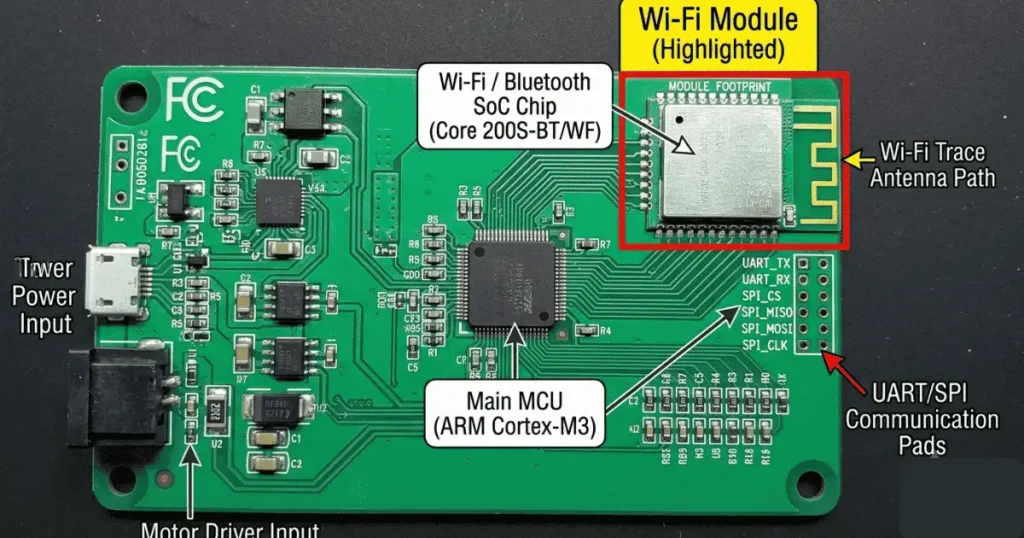
The Wi-Fi module in the Core 200S is a compact PCB-mounted component, either a standalone module soldered onto the main PCB or a chip-level implementation integrated directly into a system-on-chip (SoC) that also handles other machine control functions. The specific module or SoC varies between Core 200S production runs, but Levoit’s smart home product line has historically used modules based on the Espressif ESP8266 or ESP32 chipset family, or equivalent Chinese domestic SoC equivalents (Tuya-based chipsets are common in Levoit products that use the VeSync infrastructure).
The module or chip contains:
- A Wi-Fi radio transceiver operating in the 2.4 GHz ISM band
- An onboard antenna (PCB trace antenna or chip antenna; both are compact and do not require an external whip antenna)
- A microcontroller core running the module’s firmware (separate from the main machine MCU in modular designs)
- Flash memory storing the Wi-Fi module firmware, network credentials, and device configuration
- Communication interface to the main machine MCU (typically UART serial or SPI)
WHY 2.4 GHz ONLY: THE HARDWARE CONSTRAINT EXPLAINED
The 2.4 GHz-only limitation of the Core 200S Wi-Fi module is a hardware decision, not a firmware restriction. The radio transceiver inside the module is physically tuned to operate in the 2.4 GHz ISM band (2.400 to 2.4835 GHz). It has no hardware capability to receive, decode, or transmit on the 5 GHz band (5.150 to 5.850 GHz used by 802.11a/n/ac/ax).
This is not a cost-cutting shortcut specific to Levoit it reflects the appropriate engineering choice for an IoT device in this category:
Range advantage:
2.4 GHz radio waves have longer wavelengths than 5 GHz, which means they diffract more effectively around obstacles (walls, furniture) and attenuate less per meter through building materials. For a device that may be placed in a bedroom distant from a central router, 2.4 GHz provides more reliable connectivity than 5 GHz at equivalent transmit power.
Bandwidth sufficiency:
The Core 200S transmits only control signals and tiny sensor data packets measured in tens to hundreds of bytes. The maximum 54 Mbps theoretical throughput of 802.11g on 2.4 GHz is orders of magnitude above what the application requires. 5 GHz’s bandwidth advantage is irrelevant for this use case.
Module cost and PCB complexity:
Dual-band 2.4/5 GHz modules require more complex RF design, additional filtering components, and more precise PCB layout to manage the two RF domains. This complexity is appropriate for laptops and smartphones; it is engineering overkill for an air purifier’s control interface.
The practical consequence for users:
Connecting the Core 200S requires a 2.4 GHz network to be present and accessible. Dual-band routers that broadcast a single merged SSID (the “smart connect” or “band steering” feature present in many modern mesh routers) must be configured to broadcast a separate 2.4 GHz SSID, or band steering must be disabled, before Core 200S pairing can be reliably completed.
THE VESYNC CLOUD COMMUNICATION ARCHITECTURE
The Core 200S does not communicate directly with the VeSync smartphone application over the local network. Instead, it communicates through a cloud intermediary architecture:
Core 200S → Router → Internet → VeSync Cloud Servers → Internet → VeSync App (smartphone)
This means:
1. All commands sent from the VeSync app travel to Levoit’s cloud servers first, then are relayed to the device.
2. The device must maintain an active internet connection (not just a local Wi-Fi connection) for the app to control it.
3. If the VeSync cloud servers experience an outage, app control of the device fails even with perfect local Wi-Fi connectivity.
4. There is no local API that allows device control on the LAN without internet access (in the standard firmware).
The module maintains a persistent MQTT (Message Queuing Telemetry Transport) connection to the VeSync cloud broker. MQTT is a lightweight publish-subscribe messaging protocol specifically designed for IoT devices. It has very low overhead, supports persistent connections, and handles the intermittent connectivity patterns common in IoT networks gracefully.
The device publishes sensor data (air quality indicator state, fan speed, filter life counter) to its MQTT topic at a configured interval. The VeSync cloud broker stores this data and delivers it to the app on demand (for the air quality history graphs). The cloud broker also publishes control commands (fan speed change, on/off, mode change) to the device’s subscription topic when the user sends commands from the app.
WHAT HAPPENS DURING INITIAL WI-FI PAIRING: THE PROVISIONING SEQUENCE
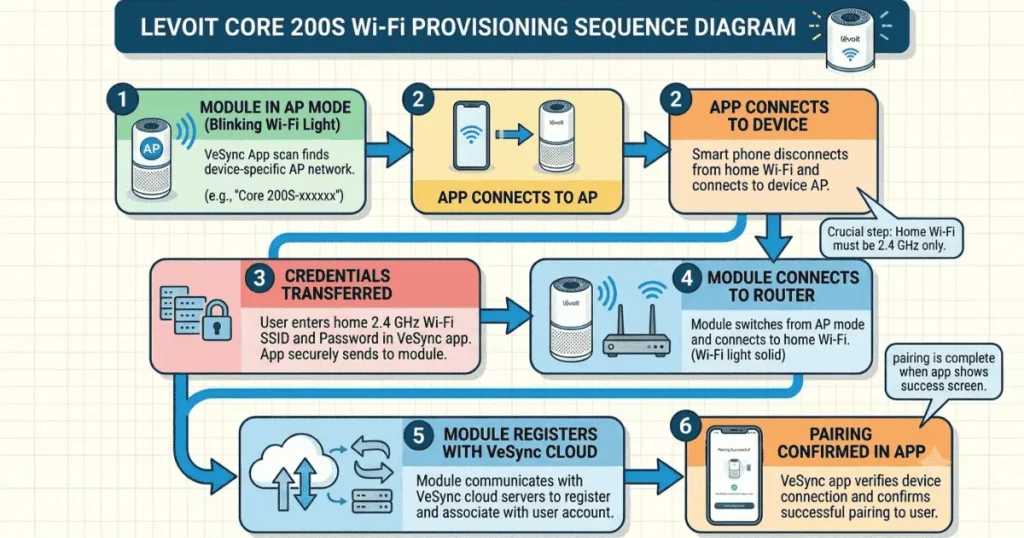
The initial Wi-Fi pairing process involves a provisioning protocol that transfers the network credentials (SSID and password) from the smartphone to the Core 200S module. Understanding this sequence explains why each step in the pairing procedure is required.
Phase 1 — Module broadcast mode
When the Core 200S enters pairing mode (triggered by holding the Lock button for 5 seconds), the Wi-Fi module enters a mode in which it broadcasts its own small Wi-Fi access point. This temporary network is visible only briefly during the pairing window.
Phase 2 — App-to-module handshake
The VeSync app, running on the smartphone, connects to the module’s temporary access point. Through this direct connection, the app transfers the user’s 2.4 GHz network SSID and password to the module’s flash memory.
Phase 3 — Infrastructure connection
The module switches from AP (access point) broadcast mode to STA (station) mode, connecting to the user’s router using the transferred credentials. If this connection succeeds, the module registers with the VeSync cloud using its device ID and the user’s VeSync account credentials.
Phase 4 — Cloud registration confirmation
The VeSync cloud confirms device registration and the app receives confirmation that the device is online. The pairing process is complete.
Failure at Phase 3 is by far the most common pairing failure scenario. It occurs when the transferred credentials are for a 5 GHz network, when the password was entered incorrectly, when the router has MAC filtering enabled, or when the router’s signal is insufficient at the Core 200S’s installation location.
FIRMWARE: WHAT IT CONTROLS AND HOW IT UPDATES
The Wi-Fi module’s firmware governs:
- The provisioning protocol for initial pairing
- The MQTT connection management (reconnect behavior after dropped connections, keepalive interval)
- The data publishing rate (how often sensor data is sent to the cloud)
- Security certificate management for the TLS-encrypted connection to the VeSync cloud
- OTA (Over-the-Air) update reception and installation
Firmware updates for the Core 200S Wi-Fi module are delivered OTA. The module downloads and installs firmware updates silently when connected to the internet, without user notification or intervention. This is the expected behavior for IoT device firmware management. Updates can change reconnection behavior, MQTT protocol parameters, and cloud communication endpoints, which is why connectivity behavior sometimes changes after a module update.
The module firmware version is not directly visible to the user in the VeSync app’s standard interface. For users experiencing persistent connectivity issues after a period of stable operation, an OTA update that altered reconnection parameters is a plausible contributing factor, particularly if the issue appeared without any change to the local network.
DIAGNOSING WI-FI MODULE FAILURE VS. NETWORK CONFIGURATION ISSUES
The Core 200S Wi-Fi module itself rarely fails electronically. The overwhelming majority of “Wi-Fi not working” reports on the Core 200S are network configuration issues or credential problems, not module hardware failures. True module failure is characterized by:
- The module never enters broadcast/AP mode during pairing attempts regardless of how many times the factory reset is performed
- The Wi-Fi indicator light behavior is absent or inconsistent during pairing attempts (does not blink as expected when pairing mode is activated)
- The device was previously connected and dropped offline permanently following a physical event (drop, liquid ingress, power surge)
Network configuration issues (which are far more common) produce a different pattern: the module enters pairing mode correctly (indicator blinks), pairing attempts proceed to Phase 3, but fail to complete. This is a network or credential issue, not a module failure.
For persistent post-pairing disconnection issues, the device pairs successfully but drops offline regularly. The causes and resolution are covered in the companion guide, Levoit Core 200S Keeps Disconnecting from Wi-Fi / VeSync App Fix.
THE MODULE IN THE CONTEXT OF THE CORE 200S CONTROL ARCHITECTURE
The Wi-Fi module is one of two control pathways for the Core 200S the other is the physical touch panel. The main MCU arbitrates between these two control sources. Commands received via Wi-Fi (from the VeSync cloud) and commands received from the touch panel both reach the main MCU through different interfaces (UART from the Wi-Fi module; direct GPIO from the touch sensor layer) and are processed by the same MCU firmware to drive the motor controller and LED indicator outputs.
This architecture means that touch panel functionality is completely independent of Wi-Fi connectivity. A Core 200S with a failed or disconnected Wi-Fi module operates normally as a standalone appliance all fan speeds, Auto mode, Sleep mode, and the air quality indicator function without any Wi-Fi connectivity. The smart features are additive, not fundamental, to the core operation.
For a complete picture of how the setup process, power consumption, and VeSync pairing interact, including the correct sequence for initial device configuration, see the companion guide Levoit Core 200S Setup, Wi-Fi Connection, Power Consumption & USA Voltage Guide.